Thursday, September 26, 2013

Cool Facebook Status, Chat Tricks and Tips

Most of us use Facebook to interact with some of our long separated friends but that does not mean we cannot have fun on Facebook. Here is a collection of tricks, tips and Easter eggs you can use to enjoy your experience on Facebook.

Facebook Easter Eggs: Pirate Language ,Turn Facebook Upside Down

Facebook is not as famous for its Easter eggs as Microsoft, but that does not mean that Facebook's Easter eggs are not entertaining. The one which I especially find interesting is the Pirate Language trick. To enable Pirate Language in Facebook, login to Facebook, click on the down arrow at the right of the top navigation bar, click on Account Settings, click on Edit at the right of the Language option, and in the Primary Language dropdown menu, select English(Pirate) located somewhere near the bottom and be the captain of your Pirate Ship.

Facebook tricks
Blabber t' yer mates

Similarly, you can also turn Facebook upside down by selecting English(Upside Down) from the Languages dropdown. This will flip the entire Facebook interface but your status updates would still be "normal".

Facebook Tips
See. Mark Zuckerberg does know how to headstand.


Chat on Facebook in your Firefox sidebar while browsing other Websites

To do this, you need to bookmark http://facebook.com/login.php. Then click on Show all Bookmarks (Manage Bookmarks in older versions) in the Bookmarks menu, then locate the newly created bookmark, single click on it, then click on more in the footer, then check Load this bookmark in Sidebar. Now, you can open that bookmark in Firefox's sidebar and keep on browsing other websites too.

Facebook chat

Show Facebook Status Updates only to Specific People or Hide them from someone

Facebook gives you the option to show your status updates to everyone or only your friends. You can further optimize Facebook so that your status updates are shown only to people you wish. Go to Privacy Settings by clicking the Settings icon at the right of the top navigation bar and clicking Privacy Settings. Then, in the Who can see my stuff? section, click on "Who can see your future posts?". Then, customize who you wish to show your posts by clicking on the down arrow that appears next to the Post button on the non-functional status update box. You can also hide your statuses from specific people by adding their name in the Hide from These section under Custom settings. You can also individually change the audience of your posts. Go to the post whose audience you wish to change and choose a different audience by clicking on the globe icon (which denotes that the post is public).

Hide Facebook Status

Hide your past posts so that only your friends can see them

Now you can also customize your past posts so that only your friends can see your past activity. To do this, open Facebook Privacy Settings and under the "Limit the Audience for Past Posts" option, select "Limit Old Posts."

Tag people in Status Updates, Wall Posts, Comments or Text

To tag someone in text in a manner that a link is created to the person's profile, use the @ symbol. eg. If you wish to tag John Jamison in your comment write @ John Jamison without any spelling mistake. If the person is in your friend list, a link in blue will be automatically created to the person's profile and he would be "tagged".
Tag Statuses Text Comments
Facebook text tagging in action


Write Upside Down, In Bubbles or Inverted Mirror-like text on Facebook

You might have seen many people update their Facebook status saying that "this was the last time they bought a keyboard on eBay" or "they have finally learnt how to update Facebook statuses while doing a headstand" written upside down. Here is how you too can flip text like that and add much more cool effects. Just go to Upside Down Text, uncheck Backwards effect, enter your text and copy the inverted one from the inverted text column and paste it in your status update or chats. You can also write inverted mirror like text by un-checking the upside down effect. To write in bubbles, click on the Bubble Ball text in the top Navigation bar.

e.g. Mirror Effect:- !rorrim a ni deppart ma I !oN hO

e.g. Upside Down Effect:- ɯɐp ʞǝʎqoɐɹp¡

e.g Both Mirror and Upside Down Effect:- ¡poפ ǝɯ dlǝH ˙ʎzɐɹɔ ƃuıʇʇǝƃ sı uıɐɹq ʎW

e.g. Text in Bubbles:- Ⓞⓗ Ⓝⓞ! Ⓜⓞⓡⓔ ⓑⓤⓑⓑⓛⓔⓢ

How hackers hack Facebook Account & How to stop them?

Facebook is, undoubtedly, the most popular social networking website with more than 500 million active users. Due to its popularity, many hackers (or should I say crackers?) are actively involved in hacking Facebook accounts of unsuspecting users. This article outlines the many strategies that such hackers use to gain access to Facebook accounts of hundreds of users each day and how you can stop them from hacking your account.


hack facebook account
Facebook is one of the prime target of hackers!

Email Address Hack

I have always been puzzled by Facebook's leniency in this matter. All a hacker needs to do is know your email address and he will be displayed  a confirmation showing your name even if he enters the wrong password. How easily a hacker can then hack your Facebook account if he 'guesses' your password (if you use a weak password) or answers your security question! This is something I hope Facebook improves on quickly. Until Facebook does so, here are some tricks you can use to protect yourself from this vulnerability.

How to safeguard your Email Address?
Just follow these steps:-

  1. Hide your Email Address from everyone by going to Edit Profile>Contact Information>Clicking on the icon beside your email address> checking 'Only Me'.
  2. Change your primary email address to a one that is only known to you by going to Account Settings>Email> and changing your primary email to the new one (known only to you) and removing your previous email address.
  3. For additional security, when in Account Settings, check 'Secure browsing' and 'Send me an email when a new computer or mobile device logs into this account' and click Save.

hack facebook
A hacker at work!

Phishing

Phishing is one of the easiest ways to trick users into giving out their login credentials. All a hacker does is setup a webpage similar in design to that of the Facebook homepage, attach a server sided script to track the username and password entered and store it in a log. Sending people emails stating that someone tagged a photo of them on Facebook in the same format as Facebook and giving a link below to the phishing website further reduces the chances of it being detected as a fake. Sometimes, spam Facebook apps, like those promising to tell who viewed your Facebook profile, automatically post links to phishing websites. A new trend amongst phishers is creating Facebook look-a-like widgets for stealing user's login credentials.

How to prevent yourself from being phished?
At all costs, avoid clicking on suspicious links. Moreover, always check the URL in the address bar before signing in. Avoid logging in through various "Facebook widgets" offered by websites and blogs. Instead, use Facebook's homepage to sign in. Always try to use Safe Search while searching. If you do manage to get phished, report the website so that others may get a warning before visiting it.


hack facebook password

Keylogging through Keyloggers

Keylogger is a type of computer virus that tracks key strokes. Keyloggers can be installed remotely on a computer system by a cracker to record all the activity that is going on the victim's computer. Keylogging gets more easy if the hacker has physical access to the victim's computer.

How to stop keyloggers?
Install a good antivirus and update it frequently. Do not click on suspicious links and avoid downloading illegal software. Also, avoid installing free toolbars and other such spam software. Always scan third-person's flash and pen drives before using them on your computer.

Detailed Guide:- PC Security tips to make computer secure

Social Engineering

Social engineering involves using any trick to fool the user into making himself vulnerable to exploits. This could involve anything from sending spoof emails, pretending to be from Facebook, telling you to change your password to 12345678 to a hacker maliciously getting out the answer to your Security Question in a friendly chat or discussion.

How to prevent yourself from being socially engineered?
Stay aware during chats and discussions. Use a tough security question, preferably one whose answer you would never disclose to anyone. Moreover, Facebook, or any other company for that matter, will never ask you to change your password to 12345678 or do something as silly as asking you to send out your login details to prove that you are an active user. Always think before taking actions and your e-life on Facebook will be safe from hackers looking to hack Facebook accounts.

Change Facebook Theme, Color & Appearance

Facebook is a social networking site which enables people to connect with friends and people around. That's how Facebook is usually introduced. However, Facebook is beyond the need of being introduced as almost everyone is on it. Despite its popularity, Facebook has one flaw; the default blue theme is really boring.

Some even consider it an annoyance while visiting Facebook. As Facebook does not allow users to change its theme like MySpace used to, users are left with no other option but to bear the theme Facebook wants them to use.

However, it is relatively easy to change the Facebook theme to a stylish one using an addon and custom themes which are available free of cost on the internet.

An example of the final outcome would be something like in the image.


Change Facebook Theme
This is the Ferrari theme. More themes are available for you to choose.


Requirement: The basic requirement for this to work is to have Mozilla Firefox or Google Chrome as your browser.

Steps to achieve this: If you use Google Chrome, click here. Mozilla Firefox users should carry out the following steps to successfully change Facebook theme.

  1. Open Mozilla Firefox and install 'Stylish' addon.
  2. Follow the basic steps to install the addon.
  3. Restart Firefox after successfully installing the Stylish addon.
  4. Login to your Facebook Account and click on the small 'S' button in your Firefox status bar.
  5. Click on "Find Styles for this Site" to open a new tab with free themes to use for Facebook.
  6. Click on any theme and a preview will be shown.
  7. If everything is fine in the previewed theme, click on "Install with Stylish" button at the top right corner of the page.
  8. A dialog box will open.
  9. Click on Install in the dialog box.

Steps for Google Chrome
  1. Install Stylish for Chrome from the Chrome Web Store.
  2. Navigate to Facebook.com and click on the S button.
  3. Click on "Find Styles for this Site" to open a new tab with free themes to use for Facebook.
  4. Click on any theme and a preview will be shown.
  5. If everything is fine in the previewed theme, click on "Install with Stylish" button at the top right corner of the page.

Stylish Button


facebook theme change

Install with stylish

Installing Ferrari theme for Stylish Firefox

Now whenever you open Facebook, it will show the theme that you have installed with Stylish instead of the boring old blue theme.

Why Facebook is Blue in Color?

When you open Facebook, the first thing that you notice is the blue color it uses. Ever wondered why is Facebook so blue in color and not changing its color scheme?

Ever since they started as 'thefacebook', Facebook has stayed with the blue color. Although major changes have been made in the Facebook theme since then, the major unchanged thing has been the blue color.


facebook blue color
Facebook from its early days when it was known as  thefacebook

An exciting fact: In its earlier days, thefacebook.com required you to have an  .edu email id to join.

Everywhere from its login page to Facebook groups, you find only blue.

facebook is blue
Facebook Login Page. All Blue!

The reason for this is that  Mark Zuckerberg, the young founder of Facebook is red-green color-blind and blue is the richest colour for him which he confirmed in an online interview with Leo Laporte.

Another important commercial factor for using blue color is the fact that most colors tend to distract the viewers. Blue on the other hand acts as a transparent background to the main content as visible to the human brain due to which most popular websites tend to use the blue color. It can easily be called a webmaster's favorite color. Blue color is also sometimes referred to as 'Nirvana' for the brain.

All these factors make blue a prominent color on Facebook.

If you are bored with Facebook's blue theme and want a stylish theme, visit Change Facebook Theme.

Facebook Tricks, Tips & Hacks

Almost half of all the sharing that happens online is done on Facebook. This in itself is testament enough that Facebook does the job of connecting people fairly well. However, there are some tips and tricks that can allow you to get more out of Facebook and this article contains a list of some of the best such Facebook tips.


Facebook Tricks
Stop Hackers on Facebook
Are you worried about hackers hacking your Facebook account and posting stuff you don't want them to? Just read the linked post to protect yourself from most basic hacks.

Change Facebook's Theme
Are you bored with the default blue colored Facebook theme and want to get rid of it? Go change it to something super cool in Firefox.

Minimalist Facebook Theme Tricks
Facebook Galaxy Theme
Post an Empty/ Blank Status
Are you tired of constantly thinking new and interesting status updates for your Facebook friends? Then, post an empty status and show your friends that you denounce the thinking that if your status isn't cool, you aren't either. Just go to Facebook, hold Alt and press 0, 1, 7 and 3 respectively and click Post. This will post the null character as your status which basically is an empty space. Laptop users can do this after activating the Number Lock.
Facebook Tricks, Tips, Hacks
This is how the empty status looks like.
Subscribe to the RSS feed of your Notifications 
Go to Facebook's notifications page and click on the RSS link to find the RSS feed containing all your recent notifications. You can then subscribe to this feed in any desktop based RSS reader to instantly know when a new notification occurs.

Change Facebook's Posted via text
Have you noticed that when you update your Facebook status from a mobile, Facebook adds a "Posted via Mobile" link at the bottom of it? You can change that to say hilarious things like "via Carrier Pigeon" or "via My Bedroom." To do this, just go to PostedVia, choose a delivery option and update your status or post to a friend's wall.
Facebook Tips and Tricks
 I posted this status from the unreleased iPhone 5 ;) 

Know when friends Unfriend you
Facebook notifies you when someone adds you as a friend but Facebook does not notify you when someone unfriends you. If you wish to access this data, you can use Social Fixer Facebook extension, which will not only allow you to do this but a lot more too.
Facebook Tricks Unfriends

Update Facebook Status from Firefox
FireStatus is a Firefox addon that allows you to instantly update your Facebook status without having the need to visit Facebook again and again.

Facebook Firefox

Use Dynamic Facebook Profile Links to Fool your Friends
This is a funny use of technology to have fun with your friends. Just say some mean things in your status and then include this link -> www.facebook.com/profile.php?=1233445566. This may look like a link to a specific person's Facebook profile but in reality, it redirects users to their own profile. This happens because of the missing 'id' parameter. You can change the numbers to anything you like.

Facebook Tricks Search
Find Exactly What you are looking for on Facebook
If you ever had trouble finding a friend or a specific post by one of your friend, you should definitely take a look at the Facebook page on searching. It will help you to get acquainted not only with how Facebook search works but also enable you to get the most out of it.

Facebook Notifications Tricks
Access Facebook Chat on Your Desktop
Have you ever wanted to chat with your Facebook friends without opening a web browser? Desktop based applications like Digsby can allow you to stay connected with all your friends even when you close your web browser. This is much similar to chatting with Yahoo! Messenger or Google Talk chat client.

Wednesday, September 25, 2013

9 Free Web Hosting Providers You Should Try

The best things in life are free; but is this saying also true for web hosting providers? Yes, there are free web hosting providers that offer free web hosting. No monthly fees, no bills, no hosting packages; you get free web hosting services and even some perks that will help you create a professional web site for free.

Different free hosting sites have different features; but as it’s free, you can never tell if it offers reliable hosting features. This is why looking for free best hosting providers is like shopping for shoes; you need to find the one that will fit your individual business website needs.


Free Web Hosting


The basic feature of free web hosting services is web hosting with PHP & MySQL support; so your site can benefit from PHP–based web applications like Joomla, Mambo, WordPress, Drupal, SMF etc. Another feature that you may find is forced advertising; something that is very common in free hosting sites but not all of them have forced ads. Some of them give hosting with no ads at all.

Here is a list of free reliable web hosting providers to check out:

Hosting.eu.pn – they offer free hosting with absolutely no ads. You get 200 MB free web space and 4000 MB bandwidth per month. PHP4, PHP5, MySQL 5 database, Webmail access, FRP access, online file manager, Joomla support and FrontPage are some their features. When you subscribe, you get 5 free sub-domain names.


Biz.ht – this is a one of a kind reliable web hosting company that offers an Eco-friendly free green service plan. You get 250 MB of web space and 5 GB data transfer per month. Included are PHP5, MySQL, CGI, WordPress support and several free sub-domain names. They are powered by wind and 100% green energy.


Biz.nf – this is a business hosting site with no ads, no pop ups and no subscriptions. It provides 250 MB free web space, 5 GB monthly bandwidth, POP3 account, Webmail, FrontPage extensions, FTP support, PHP 4/5, MySQL, WordPress blogs, free sub domain names and many more perks.


AwardSpace.com – a no ads plan that provides 250 MB disk storage space, 5 GB monthly bandwidth, 5 Pop3/IMAP email accounts, PHP, MySQL, CGI, access to FrontPage and an efficient control panel.


Zymic – offers ad-free web hosting services giving you 6 GB disk space per account; plus you may have unlimited accounts per user. 50 GB monthly data transfer, FTP access, PHP, 3 MySQL databases and free sub domains are some of its features.


100webspace.com – they have a free web hosting plan that provides 100 MB web space, 3 GB data transfer, Webmail accounts, FrontPage support, PHP/MySQL, FTP support, efficient password protection and much more. The only disadvantage is that they have forced ads.


Xtreemhost – allows 2.5 GB disk space with 100 GB monthly data transfer, 10 MySQL databases, FTP support and more.


Hosting Engine – this free web hosting service offers 250MB disk space, 5 GB of monthly data transfer, domain hosting, latest MySQL versions and more.


Host-Ed – this is a free web hosting service which gives you 1000 MB free space, 10 GB of monthly bandwidth, 10 MB MySQL databases and more.

Computer (PC) Tricks You Should Try Right Now

Computers have simplified our life to a great extent. Things that were impossible earlier can now be completed instantly thanks to computers. But, does this mean that a PC is all work and no play?

Obviously not! Here are some of the best tricks you can try out on your Windows based computer.


Computer Tricks
1) Make your computer speak what you type
You can use your PC's built in features and some VBScript magic to create a simple program that will make your computer speak whatever you input to it. What are you waiting for? Head over to this post to start a conversation.

2) Find your computer's gender
Want to know if your PC is a male or a female? Simple. Try the previous trick to know if your computer is a 'he' or a 'she'.

On a serious note, this depends upon the voice you have selected in Microsoft Text to Speech options.

3) Lock Folders with password
Do you often have other people seeing your personal files? You can store them in a password protected folder so that only you can access them. Go see this post to know how to protect your personal files effectively.

4) Make your computer greet you every time you start Windows
A simple modification in the first trick will let you have an awesome computer said welcome that you can use to impress all your friends. Just read this post to make your computer welcome you in its own mechanical voice.

5) Have fun with Notepad
PC Tricks
If you think that Notepad is just a basic text editor, then, you will be amazed by its capabilities. You can use Notepad to create everything from personalized logs to harmless viruses that are incredibly annoying. Go see this post to know just how useful Notepad is.

6) Command Prompt too has some tricks up its sleeves
So, you thought that Notepad has some tricks but not the command prompt? If you thought so, then you would be surprised to see all the cool stuff you can do with the Windows Command Prompt. Just see this post to get impressed.

7) Change your Processor's name
Are you bored of your old processor and want a new one with a staggering name? Change its name to something extraordinary to get that something special for your PC.

8) Make a Keyboard Disco
Use some VBScript coding to create a live disco using the LED keys on your keyboard. See this post to know how your keyboard can turn into a disco.

9) Use your Keyboard as Mouse.
You know you can use your mouse as keyboard using the On-screen keyboard. What if I tell you that it is also possible to do the reverse? Just read this post to see how.


These tricks work on Windows 8, Windows 7, Windows Vista and Windows XP.

Wirelessly Transfer Files on Android Devices With Dropbox

As great as smart phones have become when it comes to handling our digital lives, there are still a few tiresome concessions we make for their use. One is having to plug our device into our computer in order to transfer files. Some manufacturers such as Apple have launched new services to alleviate that using cloud computing. Here is one way you can send files to your Android based phone completely free without the help of a USB cable.

Transfer files android wireless
Transferring files wirelessly on Android using Dropbox is easy

Step 1: On your computer, navigate to dropbox.com and download the application installer.

Step 2: Once the application has been downloaded, run it and an initial set up wizard should begin.

Step 3: Using the initial set up wizard, create a Dropbox account by entering your name, email address and computer name.

Step 4: A folder called Dropbox should now be available on your computer. Put any file you wish to wirelessly send to your phone in this folder.

Step 5: On your Android phone, open your App drawer and open the Market application.

Step 6: Search for Dropbox and install the application.

Step 7: Once installed, return home and re-open your App drawer and start up the Dropbox app.  

Step 8: Tap the existing Dropbox account button and log in using the account you just created in step 3.

You should now see any files you have in the Dropbox folder. Transferring additional files to your phone wirelessly is now as easy as dragging them into the folder and starting the app on your phone. Dropbox allows you to send up to 2GBs of data for free. Any files larger than that will either have to be transferred via hard connection or you’ll have to sign up for a 50 or 100 GB plan.

Have a functional Website as your wallpaper

Wallpapers are probably the first thing which we get bored of in our computers. Most of us have an image or Windows Dreamscene as wallpaper, but instead of having them, why not stand ahead of the crowd and have a functional website as your cool wallpaper in Windows?


A desktop showing a functional website as a wallpaper

All you need to do is:-
  1. Right Click on Desktop.
  2. Go to Properties.
  3. Click on Desktop tab. Select Customize Desktop.
  4. Under the Web tab, click New.
  5. Type the complete URL in the URL tab including 'http://'.
  6. Click OK, OK and OK again to apply the changes.

 Maximize the small window that opens on desktop and your desktop will look like one in the image.

Try it on your PC and show it to your friends to impress them. They will be surprised to see this new type of wallpaper on your computer. I did this on my friend's PC and he was too overwhelmed with this that he could not even speak a word.

How to Save Money Shopping Online using Coupons

The internet isn't just a great way to shop without leaving your home, it's also a great way to save money without the tedious, old-fashioned task of clipping coupons. With a little smart shopping and a few extra resources, the internet's vast stretches can save your budget and even give you a little extra room to "splurge" after you've got all of the essentials covered.

Online Coupon Sites

This might be the most popular way to save money when shopping on the internet. Coupon sites are all over the internet and they rely on user contributions to display a list of coupon codes for each online shopping website out there. These coupon codes range from small savings, like free shipping on your order, to bigger deals that will save you between 15 percent and 50 percent on orders at certain websites.

It's as easy as copying and pasting the special code into the website's "promotional code" box when you begin the checkout process. You'll see your savings automatically, and it will probably elicit a sigh of accomplishment. There's no greater feeling than finding a "secret" coupon code that saves you big bucks in an online purchase.

Save Money Shopping Online

Buy Your Basics Online

You can actually buy everything from your deodorant to your toothpaste and other necessities online. You can even find products online that have been discontinued from store shelves -- and you can buy them in bulk!

These websites are officially affiliated with the Rite Aid chain of convenience stores, but the online prices are far below what you would pay in the retail store. The good news is, first-time buyers can save 20 percent on their first order as well as score free shipping. And every purchase earns a 5 percent cash back reward that can be redeemed quarterly. If you go through lots of toiletries, these websites can offset your costs dramatically. Consistent purchases can end up landing you $20 or more in cash back rewards, and at these prices, that's good enough for a month's worth of free shampoo, toothpaste, and even vitamins.

Sign Up for Auto-Refill Services

Online storefronts like Soap.com are not alone in offering "automatic refill" subscriptions for the products you buy regularly throughout the year. Nutritional stores like GNC also offer this convenient service, and subscribing can land you free shipping and even regular discounts on products.

When you sign up for an automatic refill process, you give the site permission to charge your debit or credit card automatically at the same time every month. The products you've elected to buy each month are then automatically shipped to your home address without you intervening at all. You'll receive an email notification that the products are on their way as well as tracking information -- and that's all you'll need!

Because this service is brand new, many companies are encouraging customers to sign up by offering free shopping on automatic refill orders. You won't have to scour the internet for coupon codes anymore, just by signing up. Additionally, many companies offer up to a 15 percent discount on automatically-refilled orders, which can saver you further amounts from the already-discounted prices you'll find online. And, let's face it, everyone needs a regular refill of toothpaste, or shampoo, or their daily multivitamin. It really is a no-brainer to sign up and get started.

The ways to save money online are as numerous as the websites that populate the internet, but these are a few great ways to save on basic items that will allow you to spend more money on "fun" things, like clothes, vacations, and dining. Of course, those luxuries can also be found at great savings online -- but that's for another time.

YouTube Tricks, Tips & Secret Features You Might Have Missed

YouTube, the extremely popular video sharing website averaging more than 3 billion page views per day needs no introduction to its fans who spend a considerable amount of their time watching and sharing videos. While most of these users know every nook and corner of this website, there are some features that are hidden deep within, in a manner that only few of the most experienced users seem to know about them. This article contains some such features, tips and tricks.


YouTube Tips, Tricks and Features
YouTube MySpeed 
Are YouTube videos taking too much time to load on your internet connection? Visit the YouTube MySpeed page to find your video streaming speed and compare it with the average speed of your ISP, your city, your state, your country and the world.

YouTube Disco
YouTube is all set to replace your music players with YouTube Disco. This music discovery project allows you to find the videos of your choice, create a list of them and then easily watch them without having the need to choose a new video after the one you are watching is finished.

YouTube Snakes Easter egg
You can play the classic Snakes game while watching any video in your browser. Just pause and resume a video, hold the left arrow key for 2 seconds and while still holding it, press the Up arrow key. This only works in the new YouTube player on videos played on YouTube.com.

YouTube Editor
Do you edit your videos before uploading them to YouTube? Now, you don't need to because it lets you to do all of that online with YouTube Editor; well not all of that but it at least lets you combine, trim and rotate videos. The best part about YouTube Editor is that it allows you to find copyright free music that you can add to your videos. It also offers some comparably advanced features like stabilizing shaky videos and inserting transitions.

YouTube Leanback
YouTube lets you watch the videos of your choice but have you ever wanted to just sit back and enjoy watching videos just like you watch television? YouTube Leanback can help. YouTube Leanback plays high quality full screen videos tailored to your choices (if you are signed in to your Google account). If you are not signed in, you can choose a category to watch videos from, watch featured videos and even search for the video of your choice. You can then connect your TV to your computer to seamlessly enjoy TV, YouTube style.

YouTube Tips & Tricks
YouTube Leanback
YouTube XL
While you can enjoy videos on your TV using Leanback, the interface is far from desirable. So, to allow users on smart TVs browse videos more effectively, YouTube has an XL version for large screen sizes. This version does not have comments and other unimportant stuff that you see in the standard version.

Set default video playback quality
Are you annoyed at manually changing the quality of every YouTube video you watch? Now you don't need to, because YouTube has an option that automatically lets you select the quality of videos you see. If you have a slow connection, you can select the option of never playing high quality videos. You can also select the option of showing captions and annotations automatically.

Watch Videos blocked in your country : URL trick
If the URL of the video that is blocked in your country is youtube.com/watch?v={video-id}, you can access it by going to youtube.com/v/{video-id}. As an additional advantage, you will be able to view the video at the full size of your browser window.

Link to a specific time in a video
If you want to link to a video at a specific time, you can add #t=XXs to the URL where XX is a variable which represents the number of seconds after which the video will start.

YouTube Live
YouTube Live lets you find all live broadcasts available. You can also see a list of videos that are scheduled to be broadcasted at a later date.

YouTube Tricks, Tips
Watch Live broadcasts on YouTube
Create a feed of almost anything on YouTube
Just go to the YouTube Data API page and build a custom feed for yourself. However, there is a problem with the URI generated for specific categories as  "{http://gdata.youtube.com/ schemas/ 2007/ categories.cat}" is also added. Remove this and the URI is good to go.

YouTube Charts
Want to find the best videos on YouTube? Use YouTube Charts to find what other users are watching, discussing and favoring. You can select a particular category to determine the best videos in that particular category. You can even filter videos to determine what has been popular this week, this month or this year. You also have the option to play all the videos obtained in results.

Legally Watch Full Length Movies and TV Shows on YouTube
YouTube has a dedicated page to allow users to watch full-length ad supported movies for free. Movies are classified based on their genre and are offered in full HD quality. Movies are uploaded by the creators for the purpose of creating another source of revenue for themselves as Google gives them a portion of the advertising revenue. A similar page exists for TV shows.

YouTube Feather Beta
Love browsing videos but are on a terribly slow connection? Feather, the new experimental feature to allow users on slow connections enjoy YouTube might help you. It achieves this by serving the lowest amount of data to a user. Naturally, this means removal of several features that don't add much value. Feather is currently available only as an opt-in service which allows you to opt out anytime you want.

Tuesday, September 24, 2013

I'm Feeling Lucky Easter Eggs on Google

Although Google feels the I'm feeling lucky button is not 'as useful', it can still be used to try some excellent 3rd party Easter eggs that are a direct result of Google bombing (remember miserable failure and the whole George Bush case?).

While I have already written about some of these, I missed some immensely popular ones. So, this is a roundup article of all those funny "first results" I did not include in the previous article. Before starting this list, I would advise you to disable Instant from your Google preferences. To get the most out of this article, go to Google's homepage, type in these phrases and hit the I'm Feeling Lucky button.


I'm feeling lucky Easter eggs on Google
Google Loco
Type Google Loco in the Search box, hit the I'm feeling lucky button and you will be taken to a Google homepage where each letter of the Google logo will continuously dance. Also, the search button and the I'm feeling lucky lucky button are written in the incomprehensible Wingdings font. What you type in the search box also appears in the same font. Even the search box changes its colour every time you type a letter.

Google Pacman
Google I'm feeling lucky Easter eggs
Not a Google bomb but an immensely popular doodle which Google used on its homepage on the 30th anniversary of Pacman, the arcade game in May 2010. Just type Google Pacman in the search box, hit the I'm feeling lucky button and you will be taken to the Google Pacman page. You can use your arrow keys to start playing the game. To play in 2 player mode, hit the Insert Coin button. W, S, A and D keys will control the second player.

 Google Guitar (Les Paul Doodle)
Another very popular doodle which Google featured on its homepage to mark the 96th birthday of Les Paul. This flash and JavaScript based doodle allows users to not only play tunes by holding down the guitar and twanging its strings but also to record them. It also gives a link to share the recorded tunes with your friends. Just use the Google Guitar phrase or directly head over to Google Guitar.

Google Hacker
I'm feeling lucky
Ever wondered what Google would look like if it was hacked? Google Hacker can give you an idea of such a scenario. Just use the Google Hacker phrase and you will be taken to a Google homepage entirely in the leet language ( the language supposed to be used by hackers), where Normal Search is n0rM4L s34rCh, and the I'm feeling lucky button is "Eye Am ph33|1n6 |u(ky." This is an official Easter egg by one of those crazy Google engineers.

Google Weenie
Do you get angry at websites with extremely small fonts? Google weenie will definitely make you angry then. Type this phrase in the Google Search box and you will be taken to a Google homepage where everything decreases in size until it becomes a bit too small to read. This website is the exact opposite of Epic Google where everything grows in size.

Google Magic
I'm feeling lucky Easter eggs on Google
Do you like magic? Here's a trick to impress your friends with. Type in Google Magic in the Google search box and hit the I'm feeling lucky button and you will be taken to a special Google homepage. On this page, cover the two O's in the Google Logo with your hand and click anywhere on the page. Wait for sometime (5 seconds). You can say some magic words to add effect. Remove your hand and you will be surprised to see that the two O's have disappeared. Again cover the two O's and click anywhere on the page. Again wait for 5 seconds and the O's will magically reappear. A third click however will take you to the actual Google homepage.

Search Google in different colors
Are you bored of Google's default color scheme and want to try something different? Then search Google in different colors. Just use the word Google followed by your color and hit the I'm feeling lucky button and you will be taken to a Google homepage in that paricluar color. (e.g: Google Pink, Google blue etc.)

Some more I'm feeling lucky fun
In order to allow you to fully enjoy the surprise, the following keywords haven't been provided a detailed description. Just type them in the search bar and hit the I'm feeling lucky button, or alternatively click on the first search result.

Google Flight Simulator Google Gothic Goglogo Google Reverse
Google Piglatin Google GodEwmew FuddGoogle Bork
Pigeon Rank Google KlingonGoogle ChurchThe Google Book
Mental Plex Google GulpGoogle TiSPCADIE
gDay with MATE Translate for AnimalsGoogle PondG.C.H.E.E.S.E.
Funny Google "Googlo"Google BlackleGoogle Variations

Google - I'm Feeling Lucky Tricks & Jokes

Google is the search engine of choice for most users. This is well represented by the fact that Google averages one billion unique visitors every month. A reason for this popularity is Google's characteristic to integrate simplicity with usability.

Another major reason for this popularity is Google's minimalistic homepage, which consists of a search bar and two buttons, Search and I'm Feeling Lucky. We all know what the search button does, it takes us to a search results page consisting of top ten results that match our query. The "I'm Feeling Lucky" button on the other hand takes you to the top ranking page in the search results for a particular query.

Im feeling lucky

Some webpages use this behavior to create some amazing and funny results. Here is a list of few such keywords that have some funny websites at the first position in Google. To use these tricks, open Google's homepage, type in the phrase and hit the I'm feeling lucky button. To use the I'm feeling lucky button, you have to disable Google Instant.

Google Gravity
I am feeling lucky, Google
The force of gravity is non-existent in cyber space. Google gravity makes you realize how Google would have been if gravity had been effective on the internet as well. Just type Google gravity in the search bar and press the I'm feeling lucky button. This will take you to the Google gravity page which, at first look, might appear to be the Google homepage itself. Wait for a few seconds and you will realize why this Chrome experiment is called Google gravity. Although the website lists it as a Chrome experiment, it works on Mozilla Firefox as well, although it does not work on IE8 and previous versions of IE.

Google Sphere
Want to see images on Google dance in circular motion? Google sphere is the phrase for that. This phrase will take you to the Google sphere Chrome experiment. Google sphere is a modified version of Image search that adds a bit of fun to your regular search. This Chrome experiment, just like the previous one, works on Chrome, Firefox and IE9.

Epic Google 
Epic Google will take you to a growing version of Google that will continue to increase in size until it becomes too large to read.

I'm feeling lucky tricks
Enable Pirate language in Google
Remember the Facebook Pirate language trick? Google too has their own pirate version to compete with that of Facebook's. Just use the Google Pirate phrase or directly head over to Google Pirate.

Google Rainbow
This phrase will take you to a Google search homepage in which each element changes its color rapidly to create the rainbow effect. The search result page obtained for queries is very annoying too as it contains a very loud color combination of red, blue and green.

Annoying Google
Want to get annoyed while searching on Google? This one is for you. This phrase will take you to a Google search homepage with each word having alternate capital and small letters making everything a bit too hard to read.

2204355
Are you already familiar with the age old internet prank called rick-rolling and want to discover something new? Chicken rolling is for you. Try this new way of trapping unsuspecting internet users by typing the code 2204355 in the Google search box and hitting the "Lucky button."

LOL Limewire
Type in LOL Limewire in Google and you will be taken to a .swf file claiming that you are a pirate and telling you to "do what you want cause a pirate is free." Funny!

Google funny feeling lucky tricks
Find Chuck Norris
This one is for all fans of Chuck Norris jokes. We all know that you don't find Chuck Norris, he finds you. The find Chuck Norris phrase proves the fact further.

Who is the cutest?
Want to know who is the cutest person in the world? Just use this phrase. This one will definitely make you smile.

Most of these websites are not owned by Google. They were created independently to achieve these effects.

Google Tricks, Easter Eggs & Secrets

Google's engineers love to hide some pretty cool tricks at the most unexpected places. Add to that Google's policy of giving 20% of working time to its engineers to do what they want, and you have a search engine filled with lots of entertaining Easter eggs and tricks.

Sadly, most of these tricks are still a secret, but every now and then, Google employees leak these cool insider pranks and the whole world gets to know about them. Here, I have created a list of all such known Google tricks and Easter eggs that are still "working."

Google Tricks

Kerning
Kerning means adjusting the spacing between characters. So, how would you expect Google to describe it? Literally, off course. When you search Google for Kerning, the spacing of the word Kerning is changed as compared to that of other words. This only works with personalized results disabled.

Conway's Game Of Life
Conway's Game Of Life is a game that indicates how cellular life evolves based on the initial configuration. If you search Google for Conway's Game of Life, you will get a results page with the game running in the background.

Jason Isaacs
Just search for Jason Isaacs and Google will return a page saying Hello to him. This only works on Google UK. This is a reference to Kermode and Mayo's Film reviews which greets Jason with hello every week.

Bacon Number {Actor Name}
Kevin Bacon is a famous hollywood actor who was quoted as saying that he has worked with everybody in hollywood or somebody who has worked with them in 1994. This led to many websites being launched about his claim in 2007. Bacon seeing this immense response launched a charitable website called Six Degrees, which is based on a theory that everyone in hollywood has worked with Kevin Bacon through a chain of six acquaintances or less. An actor gets as many degrees as he is distant from Kevin Bacon's movies in terms of people in the chain of acquaintances.

Google too has now involved Six Degrees of Bacon in its search results. For example, searching Google for Bacon Number Johnny Depp gives Depp's Bacon number to be 2.

Google knows how to celebrate the holidays
Searching Google for a holiday will make Google return a page decorated with items representing that holiday. For example, searching Google for Christmas returns a page decorated with Christmas lights. This also works for Kwanzaa, Hanukkah, Halloween and Festivus. These Easter Eggs based on a festival are only activated when that festival is near.

Zerg Rush
Search Google for Zerg Rush and you will see the O's of Google attacking the search results page. They will attacking every result one by one. There is a health bar which indicates how injured a search result is. You can also kill these O's by clicking on them. They also have health bars which indicates their health. You get points on the basis of how many O's you kill. The aim of this game is to beat as many O's as possible.

Zerg Rush Google Easter Egg

Askew or Tilt
Ever had the chance of searching Google for Askew or Tilt? If you have, then you already know what comes up. If you haven't, do it now and you will see the search results page literally tilt to give you a better idea of what these words mean. This will work only if you use latest browsers which support HTML5 and CSS3. So, Internet Explorer users, use Firefox, Google Chrome or Safari for a while to use this.

Do a barrel roll
Google Tricks & Easter Eggs
'Do a barrel roll' in its true sense means to do a 360 degree spin. Google takes practical demonstrations way too seriously for this one and literally spins the search results page to give you a clearer idea of the meaning of this phrase. Don't believe me? Go search Google for Do a barrel roll now and see your world turn around.

This Easter egg is apparently a tribute to Star Fox, a video game series developed by Nintendo, because searching Google for Z or R Twice also does the barrel roll, just like in Star Fox. Many bloggers interpreted a lot of different things from this, but Google clarified that this fun trick was created by a Google Engineer solely for the purpose of entertaining users along with showing the power of new HTML5 and CSS3 technologies. Like the previous Easter egg, this will only work in modern browsers.

Binary, Octal and Hexadecimal Number systems
Another one of those literal Google Easter eggs. If you search Google for "Binary", "Octal" or "Hexadecimal" (without quotes) with Search Plus Your World disabled, Google will show the number of results in the same number system. For example, searching Google for hexadecimal will return the number of results like in the image below.

Octal, Binary & Hexadecimal

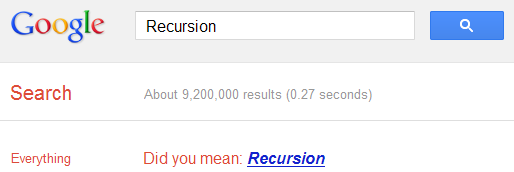
Recursion
The "Did you mean?" feature of Google often helps many users to get to the right results when they type something different from what they intended to search. If you search Google for recursion, the same feature takes you to an endless loop of clicks all linking to the same results page thereby completing recursion, which occurs when something calls itself. Seriously geeky.

Recursion Google Easter egg

Anagram
Another one of those "Did you mean?" Easter eggs. Search Google for Anagram and Google will instantly ask whether you meant "Nag A Ram" which is one of the anagrams of the word "anagram." Google really shows their word-playing skills with this one.

Asking Google to define Anagram makes Google ask if you meant nerd fame again.

ASCII Art
Are you a fan of ASCII art? Google surely is. Search Google for ASCII art and Google will greet you with a search results page having an ASCII version of the Google logo at the place where normal logo should have been. This Easter egg does not work anymore. When it did work, it looked like the image given below.
ASCII art Google Easter Egg

Google Calculator Easter Eggs: The loneliest number
Google Secrets
Do you know which is the loneliest number? Ask Google Calculator. Search Google for the loneliest number and the in-search Google Calculator will give one as the answer, which apparently is a tribute to the Harry Nilsson's song "One."

Once in a Blue Moon
Google Tricks Easter Eggs
Ever wondered how much is 'once in a blue moon'? You must have heard this phrase often but Google calculator will give you the exact value of this phrase and surprisingly, it denotes frequency rather than time. Go search Google for this to get "1.16699016 × 10⁻⁸ hertz" as the answer.

The number of horns on a unicorn
Want to know the number of horns on a unicorn? Google calculator can help. Searching Google for the number of horns on a unicorn will give 1 as the answer.

Answer to the Ultimate Question of Life, the universe and everything
Google Easter eggs
Google is omniscient. Even the "answer to the ultimate question of life, the universe and everything" is known to Google. Just search Google for the above phrase and Google calculator will give you an answer. What are you waiting for? Just go to Google and find the true meaning of life.

[Pause to give you the time to search]

Surprised by the answer (42)? This is a reference to The Hitchhiker's Guide to the Galaxy, a popular novel based on a radio show (by the same name) of the late seventies. Google engineers surprised you with these tricks, didn't they?

How to Access Blocked Websites, View Restricted Sites

Most of us find ourselves in situations where a website we wish to visit is blocked by a software or by our ISP (Internet Service Provider). So the question arises, how can we access blocked websites? The answer to this is simple: Proxy websites. Before going into details, let us know a bit about these proxy websites. 

Proxy Websites

A proxy website acts as an intermediate source between the user and server the site being contacted is hosted on. Users send requests to proxy websites which conveys them to the site's server. The reply received by the proxy website is then forwarded to the user's computer. This gives an impression to ISP's and blocking software that the user is visiting the proxy website but in reality, s/he is visiting the site which was blocked. Thus, proxy servers also provide extra security to users by hiding their online activities from their ISP's.

Acess Restricted Websites

Commonly Blocked Web Sites

The sites which are most commonly blocked at workplaces, schools and offices include websites like Facebook, Orkut, Blogger (blogspot), Google News, Typepad, eBay, MySpace, YouTube, MSN, Yahoo! Messenger, Bebo, Google Talk, Gmail, Photobucket, AOL AIM, Flickr, Twitter etc. In some countries, social bookmarking sites like Digg and Reddit are also blocked. Countries like Saudi Arabia, Pakistan, China have even blocked access to mainstream media websites like The New York times. A proxy website can be used to easily access these blocked websites. As proxy websites hide a user's location, they can also be used to access popular websites which are restricted to particular countries and block users from other countries from visiting them.

Types of Proxies

There are two types of proxies. First, there are web proxies which have an interactive interface; and second, the proxy servers which work on the basis of IP Addresses and port numbers. Proxies can also be segregated on the basis of anonymity into Anonymous, Transparent and High Anonymous depending upon the amount of privacy they provide.

How to Find Proxy Websites and Proxy Servers

A simple Google search containing the word "proxy websites" is likely to return a lot of useful results. However, most of them are likely to be lists containing proxy servers which you can setup using their IP Address and Port Number. So, in order to find interactive proxy websites, you will have to search for something like "Facebook Proxy Server" or "Orkut Proxy Server". A search like this is most likely to return interactive proxy websites with which you can access your blocked website by simply entering the URL in URL field. If you want additional security and anonymity, you can opt for a paid proxy server.

If you do not want to search, here are few popular free proxy websites you can use:-
  1. http://www.hidemyass.com
  2. http://www.spysurfing.com/
  3. http://proxify.us/p/

How to access Blocked websites

How to Setup Proxy Servers using their IP Address

If you wish to visit your blocked website using a web proxy, you do not need any setup. However, if you wish to use a proxy server that can only be accessed by using its IP address and port number, you must configure your browser to use it. Follow the instructions given below to setup this type of proxy in your browser:-

Google Chrome and Internet Explorer Users

Google Chrome uses the same network settings as Internet Explorer. So, in order to configure Google Chrome to use a proxy server, you have to configure Internet Explorer. You can configure a proxy server in Internet Explorer by following the instructions given below:-

  1. Start Internet Explorer.
  2. Click on Tools, Internet Options.
  3. Click on Connections Tab, select your Network Connection and click on Settings.
  4. Check on Use a Proxy Server for this Connection.
  5. In the Address field, add the IP Address of your Proxy server. In the Port field, enter the Port Number.
  6. Click on OK and OK again.

Mozilla Firefox Users

Mozilla Firefox users can configure their browser to use a proxy by following the instructions given below:-

  1. Start Mozilla Firefox.
  2. Click on Tools, Options.
  3. Click on Advanced Tab.
  4. Click on Network tab.
  5. Click on Settings.
  6. Encircle Manual Proxy Configuration.
  7. Enter the IP Address and Port Number at the appropriate place. In most cases, it will be a HTTP server.  
After you have successfully configured your browser to use the proxy server, you will be able to access blocked websites whenever you browse the internet with your browser.